
How to create SharePoint FAQs
SharePoint is a powerful tool that can be used to create and manage various types of content. One useful type of content that can be created in SharePoint is an FAQ (Frequently Asked Questions) section. In this article, we will discuss the benefits of having an FAQ in SharePoint, why it is important to have one on your Intranet Portal, how to create collapsible sections in SharePoint, and what type of content should be included in an FAQ section.
Benefits of a SharePoint FAQ
An FAQ section in SharePoint can provide many benefits to your organization, including:
Improved productivity: An FAQ section can help to reduce the number of inquiries your employees receive by providing quick answers to common questions.
Increased user satisfaction: Providing easily accessible information can increase user satisfaction, making it easier for employees to find answers to their questions.
Consistency: An FAQ section can help to ensure that employees are receiving consistent answers to common questions, reducing confusion and misunderstandings.
Centralized information: Having all of your organization's common questions and answers in one place can help to reduce the time and effort required to find information.
Why Have FAQs on Your Intranet Portal?
An Intranet Portal is a great place to host an FAQ section. This is because it is a central location where employees can find all of the information they need to perform their job functions. Here are some of the reasons why you should have an FAQ on your Intranet Portal:
Accessibility: An Intranet Portal is accessible to all employees, regardless of their location or device, making it easy for them to find the information they need.
Improved communication: An FAQ section can help to improve communication between departments, by providing a central location where common questions and answers can be shared.
Self-service: By providing employees with a self-service option to find answers to their questions, you can reduce the number of inquiries your IT and HR departments receive, freeing up their time for other tasks.
What are Collapsible Sections in SharePoint?
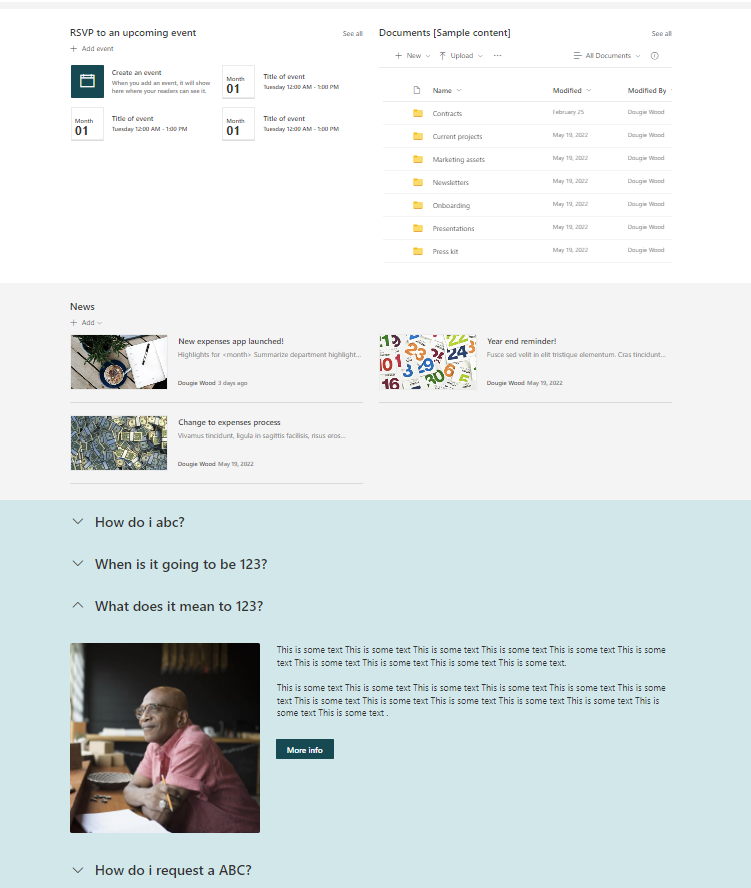
Collapsible sections in SharePoint are sections of content that can be expanded or collapsed depending on the user's preference. This is a useful feature when creating an FAQ section, as it allows users to quickly find the information they need, without having to scroll through a large amount of content.
To create a collapsible section in SharePoint, follow these steps:
Add a section to your page.
Select the section you want to make collapsible.
Click on the "edit" section tab in the left-hand side of the screen.
Look at the pop out on the right side of the screen.
Click on the "Collapsible Section" button.
Set the title of the collapsible section and any other options you want.
Click "Ok" to save your changes.
What Type of Content Should Be in a SharePoint FAQ Section?
When creating an FAQ section in SharePoint, it is important to include relevant and useful content. Here are some tips on what type of content should be included:
Common questions: Start by including answers to the most commonly asked questions in your organization.
Specific information: Include information that is specific to your organization, such as policies, procedures, and processes.
Links to additional resources: Include links to other resources that employees may find helpful, such as training materials or support documents.
Updated information: Make sure to regularly review and update your FAQ section to ensure that the information is accurate and relevant.
Get Help Building SharePoint FAQs Today!
If you are interested in building a SharePoint FAQ section for your organization, do not hesitate to contact us today. Our team of experts can guide you through the process, providing you with the knowledge and tools you need to create an effective and useful FAQ section that meets the unique needs of your organization. With our help, you can improve productivity, increase user satisfaction, and provide your employees with the information they need to perform their job functions more efficiently. Contact us today to get started.
Use the contact us form below!