
SharePoint Home site vs SharePoint Hub Site
In the ever-evolving world of modern workplace collaboration, SharePoint has emerged as a powerful tool for organizations seeking to enhance productivity, streamline content management, and foster effective teamwork. With its wide range of features and capabilities, SharePoint offers multiple ways to structure and organize content. Two prominent options are SharePoint Home sites and SharePoint Hub sites, each designed to serve distinct purposes within the SharePoint ecosystem. In this article, we will explore the differences between SharePoint Home sites and SharePoint Hub sites, highlighting their unique features, benefits, and use cases to help you make an informed decision for your organization's needs.
SharePoint Home Site: The Gateway to Your Digital Workplace

Example SharePoint Home site content
When to use a SharePoint Home site
This is the top-level site within a SharePoint tenant, acting as the gateway to the digital workplace. It is a fully customizable site that serves as a central hub for information, news, and resources, providing employees with a personalized landing page to access relevant content and applications. Here are some key characteristics of SharePoint Home sites:
Branding and customization: SharePoint Home sites offer extensive customization options, allowing organizations to tailor the site's appearance, layout, and navigation to reflect their branding and design guidelines. This flexibility ensures a consistent and familiar experience for employees.
News and announcements: SharePoint Home sites are an ideal platform for delivering company-wide news, updates, and announcements. The news web part enables easy creation and distribution of engaging articles, fostering effective communication and employee engagement.
Content aggregation: With SharePoint Home sites, you can aggregate content from across the SharePoint ecosystem, including team sites, communication sites, and other hub sites. This consolidation provides employees with a unified view of relevant information and resources, enhancing discoverability and reducing information silos.
Personalized experiences: SharePoint Home sites leverage the power of Microsoft Graph to deliver personalized experiences to users. By using AI-driven recommendations, employees receive content and news tailored to their interests and roles, ensuring they stay informed and engaged.
SharePoint Hub Site: Connecting and Collaborating Across Sites
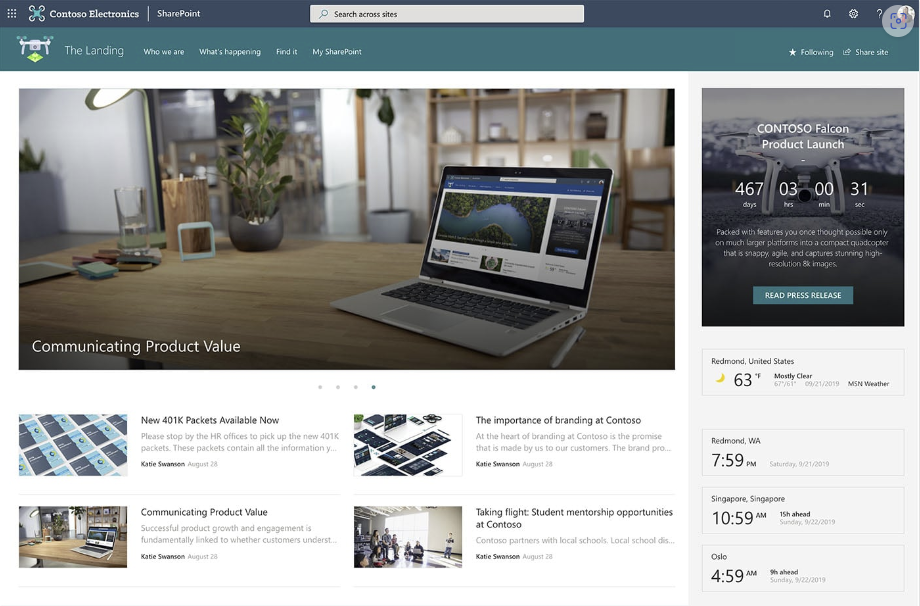
SharePoint Hub Site example of content
When to use a SharePoint Hub Site?
While SharePoint Home sites focus on providing a personalized landing page, SharePoint Hub sites serve as connectors, bringing together related sites and fostering collaboration and content sharing. Here's what you need to know about SharePoint Hub sites:
Site aggregation and navigation: SharePoint Hub sites allow organizations to create a centralized hub to associate and aggregate related sites. By connecting sites to a hub, users can easily navigate between associated sites, promoting collaboration and cross-team communication.
Consistent branding: SharePoint Hub sites enable organizations to apply consistent branding across associated sites. This ensures a cohesive user experience and strengthens the organization's visual identity.
Content roll-up: Hub sites offer content roll-up capabilities, allowing you to aggregate news, documents, events, and other content from associated sites. This aggregation provides users with a consolidated view of relevant information, enhancing productivity and knowledge sharing.
Hub-wide search: SharePoint Hub sites provide a hub-wide search experience, enabling users to search for content across all associated sites. This comprehensive search functionality improves discoverability and saves time by eliminating the need to search within each individual site.
Choosing the Right Solution for Your Organization
When determining whether to use SharePoint Home sites or SharePoint Hub sites, it's essential to consider your organization's specific requirements and objectives. Here are some guidelines to help you make an informed decision:
SharePoint Home sites are ideal if your primary goal is to provide a personalized landing page for employees, deliver company-wide news and announcements, and consolidate content from across the SharePoint ecosystem.
SharePoint Hub sites are a better fit if you want to connect and collaborate across multiple sites, foster cross-team communication, and aggregate content from associated sites.
In some cases, you may find that both SharePoint Home sites and SharePoint Hub sites complement each other. For example, you can leverage a SharePoint Home site as the organization's central landing page and create SharePoint Hub sites to connect and collaborate with specific departments or project teams.
Remember that the choice between SharePoint Home sites and SharePoint Hub sites is not mutually exclusive. Depending on your organization's needs, you can leverage one or both solutions to create a comprehensive and efficient SharePoint environment.
Conclusion
SharePoint Home sites and SharePoint Hub sites offer distinct features and functionalities to enhance collaboration and content management within the SharePoint ecosystem. SharePoint Home sites provide personalized landing pages, news distribution, and content aggregation, while SharePoint Hub sites focus on connecting and collaborating across associated sites. By understanding the differences and considering your organization's goals, you can choose the right solution or combination of solutions to create a powerful and tailored SharePoint environment that meets your specific needs.
-
No, a SharePoint home site cannot be a hub. While a SharePoint home site serves as the top-level site within a SharePoint tenant, providing a personalized landing page and central hub for information, it cannot be associated with or connect other sites. SharePoint hub sites, on the other hand, are designed specifically for connecting and aggregating related sites.
-
The main purpose of a SharePoint hub site is to bring together related sites within an organization to facilitate collaboration, communication, and content sharing. Hub sites provide a centralized hub that associates and aggregates associated sites, allowing users to navigate between them seamlessly. They also enable consistent branding across associated sites and offer content roll-up capabilities, enhancing productivity and knowledge sharing.
-
a) Team Sites: Team sites are designed for collaboration within specific teams or groups. They provide a secure space for team members to create, store, and share documents, collaborate on tasks and projects, and communicate through features like document libraries, lists, calendars, and discussion boards.
b) Communication Sites: Communication sites are intended for sharing information and news with a broader audience within an organization. They are ideal for creating engaging web pages to deliver news, announcements, and other content in a visually appealing and structured manner. Communication sites often include features like news web parts, image galleries, and quick links.
-
A SharePoint home site is the top-level site within a SharePoint tenant, acting as the gateway to the digital workplace. It provides a personalized landing page and central hub for information, news, and resources. SharePoint home sites are fully customizable and offer extensive branding options, allowing organizations to tailor the site's appearance, layout, and navigation to reflect their branding guidelines. They also provide features like news and announcements, content aggregation from across the SharePoint ecosystem, and personalized experiences using AI-driven recommendations.
-
A SharePoint hub site is a site within SharePoint that connects and aggregates related sites to foster collaboration and content sharing. It acts as a central hub that allows users to navigate between associated sites seamlessly. SharePoint hub sites offer features like consistent branding across associated sites, content roll-up capabilities to aggregate news and other content, and hub-wide search functionality. They are designed to enhance cross-team communication, knowledge sharing, and collaboration across different sites within an organization.